
AgileX Ranger Mini v3
Robonix deployment for the SysWonder Ranger Mini v3: Jetson Orin, Livox MID-360, Orbbec Gemini 336L, RTAB-Map, Scene, Nav2, and Explore.
The deployment uses native ROS 2 packages on Jetson. Zenoh RMW is the default;
start.sh starts a local rmw_zenohd for the lifetime of the boot.
Scene, Mapping, and Nav2 are explicitly selected for their Jetson-native paths.
Each package entry selects its own package_manifest*.yaml, so architecture and
native/container choices are package properties rather than global environment
variables. The same robot repository may therefore keep separate full/no-arm
deployment manifests while selecting the appropriate package target for each
component.
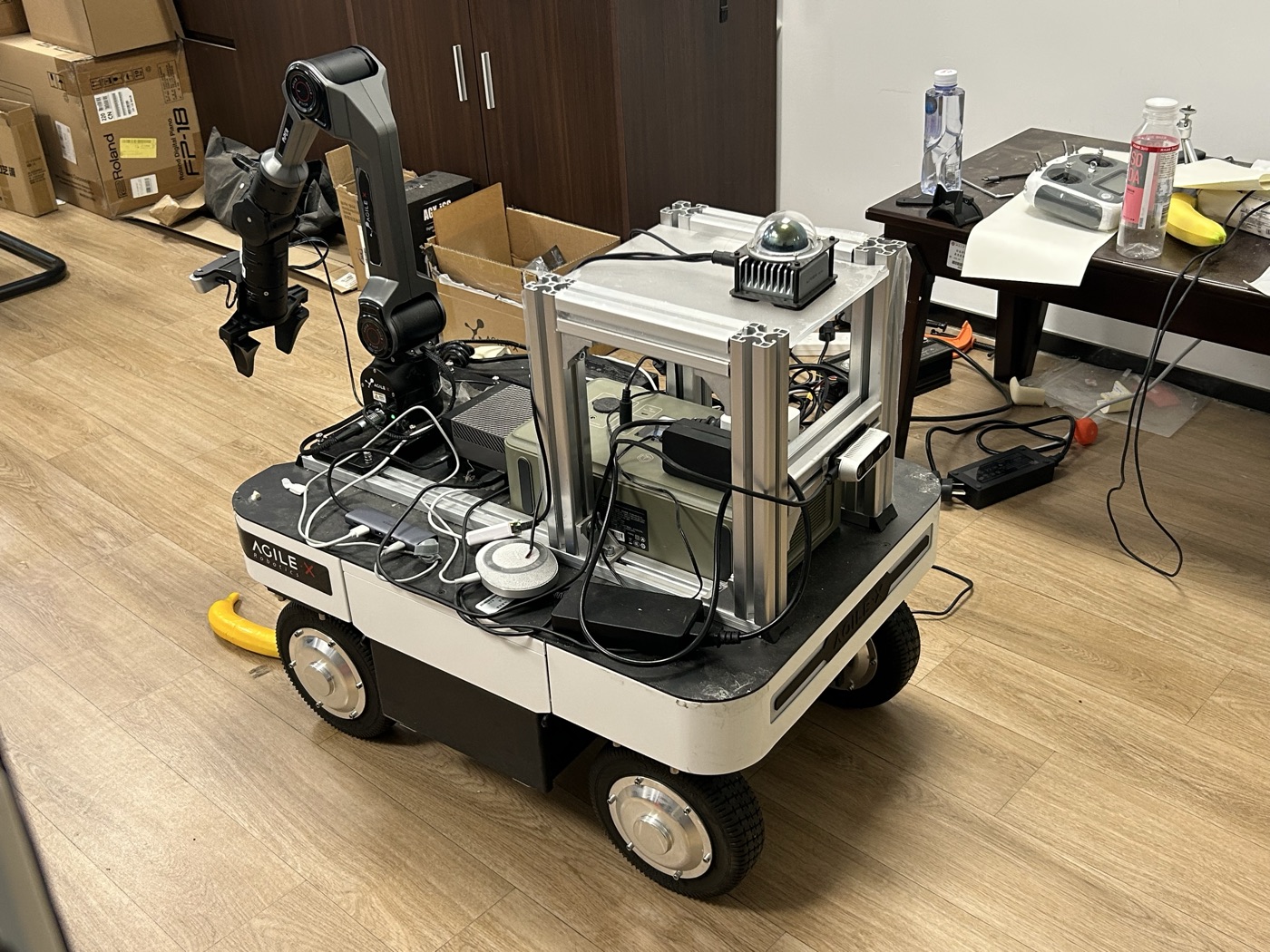
Hardware
| Component | Model | Deployment configuration |
|---|---|---|
| Mobile base | AgileX Ranger Mini v3 | Four-wheel steer/drive chassis; can_ranger at 500 kbit/s; base_link footprint 0.74 m x 0.50 m |
| Compute | NVIDIA Jetson AGX Orin | aarch64 Jetson-native packages, ROS 2 Humble, and rmw_zenoh_cpp |
| Manipulator | AgileX Piper | Six-axis arm with parallel gripper; can_piper at 1 Mbit/s |
| 3D lidar and IMU | Livox MID-360 | Ethernet lidar at 192.168.1.161; host interface 192.168.1.50; lidar and integrated IMU are separate Robonix providers |
| Front RGB-D camera | Orbbec Gemini 336L | 640 x 480 at 30 FPS for RGB and aligned depth; selected by serial number; camera IMU disabled |
| Wrist camera | Orbbec Dabai DC1 | 1280 x 720 YUYV color at 10 FPS; depth is disabled in the current pick pipeline |
| Audio | USB audio device | 16 kHz mono microphone and speaker through plughw:CARD=Plus,DEV=0 |
The exact provider IDs, device addresses, sensor profiles, and runtime options
are defined in robonix_manifest.yaml. The robot body,
component hierarchy, footprint, and provider-to-component mapping are defined
in soma.yaml. Vitals consumes Soma's body-health stream and
aggregates Robonix module health on port 50093 for trusted operator clients.
Robot-specific algorithm configuration is also deployment-owned:
config/rtabmap_params.yamlcontains the full Ranger RTAB-Map parameter set.config/nav2_params.yamlcontains the complete Ranger Nav2 configuration.config/navigate.xmlcontains the Ranger navigation BehaviorTree.config/calibration/2d_homography.npyis the hand-eye calibration for this Ranger's Piper wrist-camera mount. It is a deployment asset, not a generatedrbnx-bootcache file. Recalibrate and replace it after changing the camera mount or arm/workspace geometry.urdf/piper.urdfis the six-joint Piper kinematic model consumed byroboarm_ik. The manifest references this versioned deployment asset through${ROBONIX_DEPLOY_DIR}so a fresh clone does not depend on a cache path or another checkout.
The manifest references these files with paths relative to this repository. The Mapping and Navigation provider repositories contain templates only; do not move Ranger dimensions, sensor limits, or controller policy upstream.
Package target selection and algorithm configuration are separate. A package's
manifest: chooses a build/start implementation such as Jetson native or a
container. If a provider exposes a named params_profile, that name must be one
the provider implements upstream; a robot manifest cannot invent a new profile.
Robot-specific runtime values remain in this repository's parameter files (or
documented config overrides) and do not create a new upstream profile.
Scene is pinned to the front Gemini provider orbbec_camera. That provider
supplies both aligned RGB and depth (plus camera calibration); the wrist DC1 is
exposed separately as orbbec_wrist_camera and cannot be selected by Atlas
ordering. Scene obtains the robot's globally corrected pose from the Mapping
robonix/service/map/pose contract and combines it with the complete URDF
camera transform published by robot_description.
Prepare
Robonix dev is the recommended branch for ordinary deployments. This
repository currently reproduces the Ranger integration stack on dev-next
(including provider-pinned Scene RGB-D ingest); use dev-next until those
changes are merged into dev. Then install the ROS dependencies once:
cd ~/wheatfox/robonix
git switch dev-next
git pull --ff-only origin dev-next
make install

sudo apt install ros-humble-rmw-zenoh-cpp \
  ros-humble-rtabmap-ros ros-humble-navigation2 ros-humble-nav2-bringup
Create a private environment file; never commit credentials:
cp .env.example .env
$EDITOR .env
start.sh loads this ignored file automatically and exports it to every
Robonix child process. Keep VLM and Tencent SecretId/SecretKey here; keep
non-secret backend, AppID, engine, voice, and region settings in
robonix_manifest.yaml.
Build and boot
bash build.sh
bash start.sh
The wrappers set ROBONIX_DEPLOY_DIR, source ROS Humble, and keep the Zenoh
router lifecycle tied to rbnx boot. Each package's selected manifest chooses
its Jetson-native build and start commands.
Operator pages:
- Scene:
http://<robot-host>:50107/ - Mapping:
http://<robot-host>:8091/ - Atlas for Robonix Client:
<robot-host>:50051 - Liaison for Robonix Client:
<robot-host>:50081
Static deployment checks do not start hardware:
python3 -m unittest -v \
  test_manifest_config.py test_nav2_config.py test_nav2_acceptance.py
RViz
The deploy keeps the complete v0.1 RViz configuration and an updated mapping
variant. The updated file preserves the original map, costmap, scan, path,
goal, TF, particle-cloud, and footprint displays, and adds the Soma-backed
RobotModel plus the live MID-360 /scanner/cloud display.
source /opt/ros/humble/setup.bash
export RMW_IMPLEMENTATION=rmw_zenoh_cpp
rviz2 -d rviz/ranger_mapping.rviz
The unchanged historical configuration is rviz/ranger_v0.1.rviz.
Safety and bring-up order
The checked-in full manifest includes the chassis, Piper arm, Nav2, and skills; starting it exposes physical motion capabilities. Keep the hardware emergency stop available and clear the workspace before full bring-up.
After the chassis is powered on:
- Verify
can_rangeris UP and odometry is publishing. - Send zero Twist and confirm the watchdog holds the base stopped.
- Use a low-speed, short-duration command in a clear area.
- Verify Mapping pose and Nav2 costmaps before sending a nearby goal.
- Only then test Explore.
Robot description
soma.yaml and urdf/ranger_mini.urdf are served by Soma. The description
contains the body footprint and sensor tree used by Pilot and other consumers.
urdf/piper.urdf is currently a separate arm-only model used by the IK solver;
it is not a substitute for the Soma body tree. Mount transforms remain
calibration-sensitive; update the body URDF after physical measurement rather
than compensating in Scene or Mapping.